Cheesing Microsoft Attack Surface Reduction rules
While working on varying engagements i have been messing with Microsoft Attack Surface Reduction (ASR) quite a bit, since clients often use it to make the life of adversaries(and red teamers) just a tad harder. While working on these engagements i have compiled some tips and tricks in order to bypass/evade some of the rules that ASR offers. In this post i will dive into what ASR is and some of tips and tricks that i often use to bypass/cheese my way around said rules… So strap in and lets get going with some basic ASR understanding.
The basics of ASR
ASR was introduced back in 2017, and its core purpose was to aid organizations in reducing the attack surface of their endpoints running the Microsoft security suite. Microsoft’s approach was to define a ruleset that could be enabled on the endpoints. Each rule focussing on a different attack vector. At the time of this writing the following rules can be enabled in either Block, Audit or Warn mode:
| Rule ID | Rule Name |
|---|---|
| 56a863a9-875e-4185-98a7-b882c64b5ce5 | Block abuse of exploited vulnerable signed drivers |
| 7674ba52-37eb-4a4f-a9a1-f0f9a1619a2c | Block Adobe Reader from creating child processes |
| D4F940AB-401B-4EFC-AADC-AD5F3C50688A | Block all Office applications from creating child processes |
| 9e6c4e1f-7d60-472f-ba1a-a39ef669e4b2 | Block credential stealing from the Windows local security authority subsystem (lsass.exe) |
| BE9BA2D9-53EA-4CDC-84E5-9B1EEEE46550 | Block executable content from email client and webmail |
| 01443614-cd74-433a-b99e-2ecdc07bfc25 | Block executable files from running unless they meet a prevalence, age, or trusted list criteria |
| 5BEB7EFE-FD9A-4556-801D-275E5FFC04CC | Block execution of potentially obfuscated scripts |
| D3E037E1-3EB8-44C8-A917-57927947596D | Block JavaScript or VBScript from launching downloaded executable content |
| 3B576869-A4EC-4529-8536-B80A7769E899 | Block Office applications from creating executable content |
| 75668C1F-73B5-4CF0-BB93-3ECF5CB7CC84 | Block Office applications from injecting code into other processes |
| 26190899-1602-49e8-8b27-eb1d0a1ce869 | Block Office communication applications from creating child processes |
| e6db77e5-3df2-4cf1-b95a-636979351e5b | Block persistence through WMI event subscription |
| d1e49aac-8f56-4280-b9ba-993a6d77406c | Block process creations originating from PSExec and WMI commands |
| b2b3f03d-6a65-4f7b-a9c7-1c7ef74a9ba4 | Block untrusted and unsigned processes that run from USB |
| 92E97FA1-2EDF-4476-BDD6-9DD0B4DDDC7B | Block Win32 API calls from Office macro |
| c1db55ab-c21a-4637-bb3f-a12568109d35 | Use advanced protection against ransomware |
As you can see its quite an extensive list that introduces restrictions on a lot of the areas that is of interest to an adversary.
ASR introduces another aspect to the concept of defense in depth and compliments the Microsoft security suite very nicely. However, some of these rules can cause disruptions of the legitimate actions or binaries that is needed within a large organizations. This is where exclusions comes into the scene, they can allow an Administrator to introduce exclusions for certain folders or binaries in order to make exemptions for specific tooling, such as in-house developed applications or third-party vendors that have not been validated by Microsoft. However, this is also where it can become quite trivial for attackers to abuse such exclusions in order to bypass some of the ASR rules. This leads us into the next section where we will be covering some bypass techniques in order to circumvent one of the ASR rules.
Common ASR bypass techniques as low privileged user
For these specific bypass i will be focusing on the following rule: 01443614-cd74-433a-b99e-2ecdc07bfc25 - Block executable files from running unless they meet a prevalence, age, or trusted list criteria. This rule is often the most disruptive for an attacker or security tester, as it prevents the execution of attacker-controlled binaries that have not been validated or otherwise trusted by Microsoft. This limits the attackers ability to execute tooling on disk for domain enumeration and lateral movement to other parts of the estate.
Exclusions
Exclusions are by far the easiest and low-effort method of bypassing the Block executable rule. If present on the system and in writable locations for low privileged users such as C:, then it is quite trivial to abuse in order to get your tooling running on the target machine. Under normal circumstances you would need to have local Administrator access in order to list the Windows Defender and ASR exclusions in the following way:
1
2
3
4
Get-MpPreference | Select-Object -ExpandProperty AttackSurfaceReductionRules_Ids
Get-MpPreference | Select-Object -ExpandProperty AttackSurfaceReductionRules_Actions
Get-MpPreference | Select-Object -ExpandProperty AttackSurfaceReductionOnlyExclusions
However, you often find yourself lacking such permissions and the quest for local Administrator usually involves a lot of OPSEC unsafe actions that could lead to the activity being detected by the blue side. So what if I told you there is a stealthier method that does not require any elevated privileges…

While on an engagement a while back I stumbled upon something that I had not seen mentioned before. When browsing the event logs of the machine that I had access to, I found something interesting under %SystemRoot%\System32\Winevt\Logs\Microsoft-Windows-Windows Defender%4Operational.evtx. When filtering for event ID 5007, I found the following line:
1
2
3
Microsoft Defender Antivirus Configuration has changed. If this is an unexpected event you should review the settings as this may be the result of malware.
 	Old value:
 	New value: HKLM\SOFTWARE\Microsoft\Windows Defender\Windows Defender Exploit Guard\ASR\ASROnlyExclusions\C:\dev\tools\postmandper.exe = 0x0
At first this seemed too good to be true. Why would such a privileged action be logged to event logs where low privileged users by default are allowed to read?
But nonetheless this actually turned out to be very much true. It is possible as a low privileged user to parse the Windows event logs for any ASR exclusion. To do this in practice (the slow and stealthy way), follow the steps in the next section.
Slow and stealthy way to list exclusions
1
Event Viewer --> Applications and Services --> Windows Defender --> Operational --> Filter for event ID 5007
Then look for registry changes with the following format:
1
2
3
Microsoft Defender Antivirus Configuration has changed. If this is an unexpected event you should review the settings as this may be the result of malware.
 	Old value:
 	New value: HKLM\SOFTWARE\Microsoft\Windows Defender\Windows Defender Exploit Guard\ASR\ASROnlyExclusions\C:\dev\tools\postmandper.exe = 0x0
or as seen in figure 1:
 Figure 1: ASR exclusion visible in event viewer
If any exclusions are identified, look for those that are located in directories writable by your user. Tooling can then be executed from either an excluded folder or by using an excluded filename, for example by renaming the tool to match the excluded name or placing it in the excluded location.
The automated and less stealthy way
In order to speed up the process for gigs that require less stealth or with less mature security teams and setups, I created a PowerShell script that can parse the event logs and report exclusions and what rules are currently enabled on the machine along with their current state. This allows for quick wins and I have yet to see any security setups where this has generated an alert (yet…). The tool can be found in the following repo that I created for the purpose:
The tool will generate the following overview upon being executed (I usually just copy paste it directly):  Figure 2: ASR exclusion finder tool output
Note
When I initially found this, I decided to report it to Microsoft (I mean who would want low privileged users to read exclusions, meant only for administrative eyes), but in the expected Microsoft fashion they deemed this to not be a security issue since ASR is not a security boundary:
After thorough investigation, this case does not meet the Microsoft Security Response Center (MSRC) criteria for immediate servicing. This is because Attack Surface Reduction (ASR) is not considered a security boundary for the purposes of immediate servicing, and therefore, access to its exclusions is also not treated as a security boundary under this policy.
Recommendations
Since Microsoft does not want to do anything about this, the blue folks must take matters into their own hands. The easiest way to combat this is to prevent low privileged users from accessing Windows Event Viewer without a UAC prompt. This would force the attacker down the path of trying to escalate privileges or trying other riskier methods which could result in detection and containment.
DLL sideloading
DLL sideloading is another another great option for bypassing the ASR rule 01443614-cd74-433a-b99e-2ecdc07bfc25 - Block executable files from running unless they meet a prevalence, age, or trusted list criteria. By abusing DLL sideloading, an attacker can use a legitimate trusted binary that meets the rule’s posture checks while loading a malicious DLL that performs the attacker’s intended actions, a good example being a C2 implant. While this post isn’t meant to go in depth on DLL sideloading, I’ll briefly show how it can be used to bypass this rule.
The first step is to identify a suitable target application. It should either:
- be present on target host as an existing application
- be a portable application that can be transferred to the target machine and pass the ASR posture-checks
Large, well known software vendors such as GoToMeeting or Zoom are often good candidates for DLL sideloading, as their binaries are usually trusted, signed, and widely deployed.
Once a target application has been identified, a tool such as Procmon can be used to monitor how it loads DLLs. The goal is to look for DLLs that the application attempts to load but fails to locate because it searches for them using a relative path rather than an absolute path.
After identifying such a DLL, a proxy DLL can be created that both exposes the required exports (to prevent the application from crashing) and includes the malicious functionality.
With the proxy DLL in place, the legitimate application can be executed (assuming it passes the ASR posture checks), the malicious DLL will subsequently be loaded while the original application functionality is preserved.
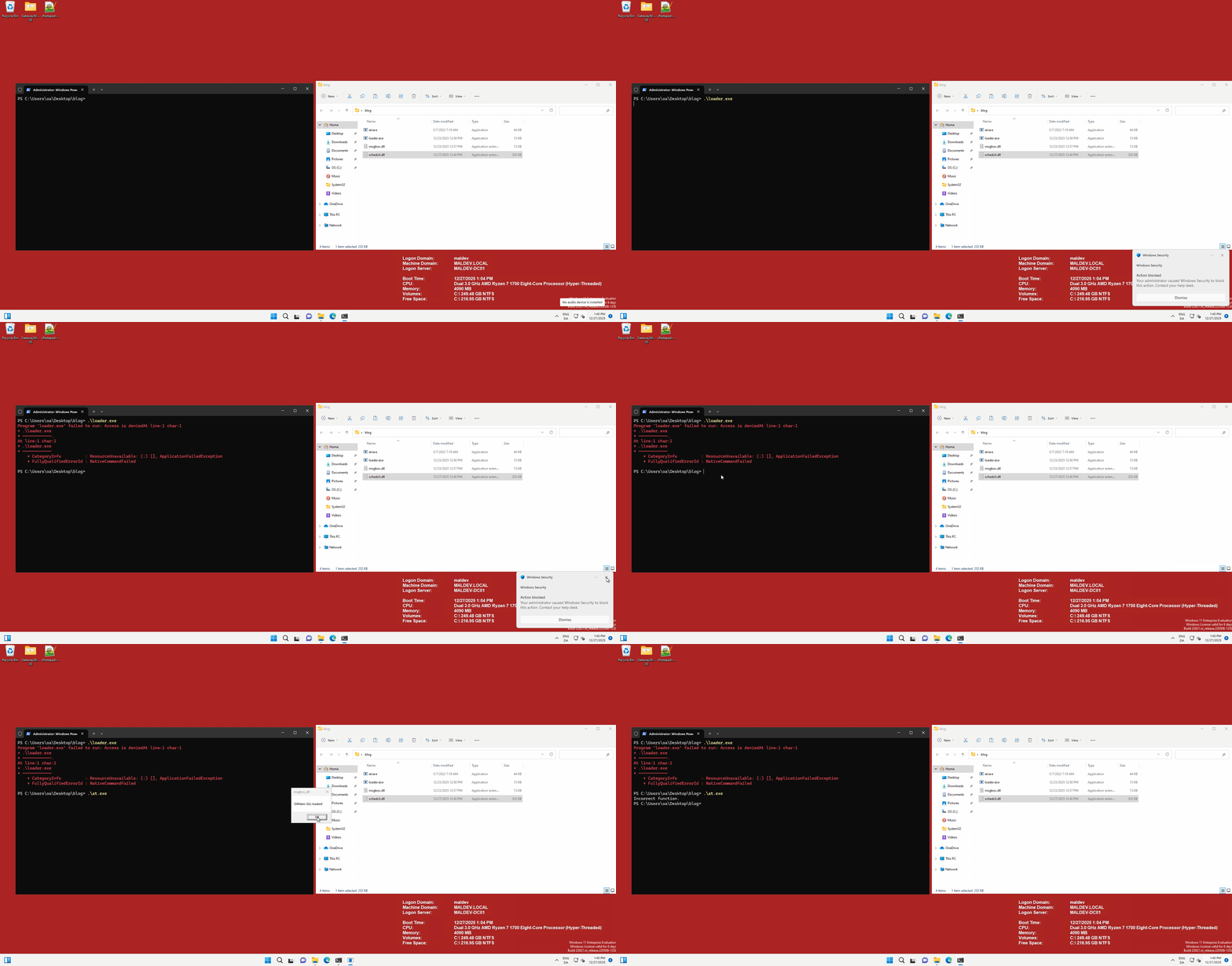
In the following example, the Microsoft binary at.exe is abused to load a malicious DLL, while ASR correctly blocks the loader.exe binary from running:
In order to learn more about DLL sideloading, I would recommend reading the following blog post by Print3M. For the creation of a sideloading DLLs, i would reccomned checking out the tool created by Print3M: DllShimmer. It allows for easy creation of sideloading DLLs without breaking the original binary.
Signing
The last and least feasible approach (in my opnion) is to sign the binary that you want to execute with a leaked certificete in order to fool trusted criterion and prevalence. This is method is way more finicky to get working and depends on what certifciate that is used to sign the binary. This can lead to a lot of trial and error and is not a recommended approach if you are working a stealthy gig where avoiding detection is paramount in order to reach the objetctives.
Signing can be done by using SignTool.exe and a leaked certificate with the following syntax:
1
SignTool.exe sign /debug /v /t "http://timestamp.digicert.com" /fd SHA256 /f "CERT.pfx"  /p "CERT_PASSWORD" /a "FILE_TO_SIGN.exe"
This will produce a signed binary that can be executed on the target machine. However, beware that a signed binary is not guranteed to bypass the ASR rule and can still be blocked if the certificate does not meet the criteria for trusted criterion and prevalence.
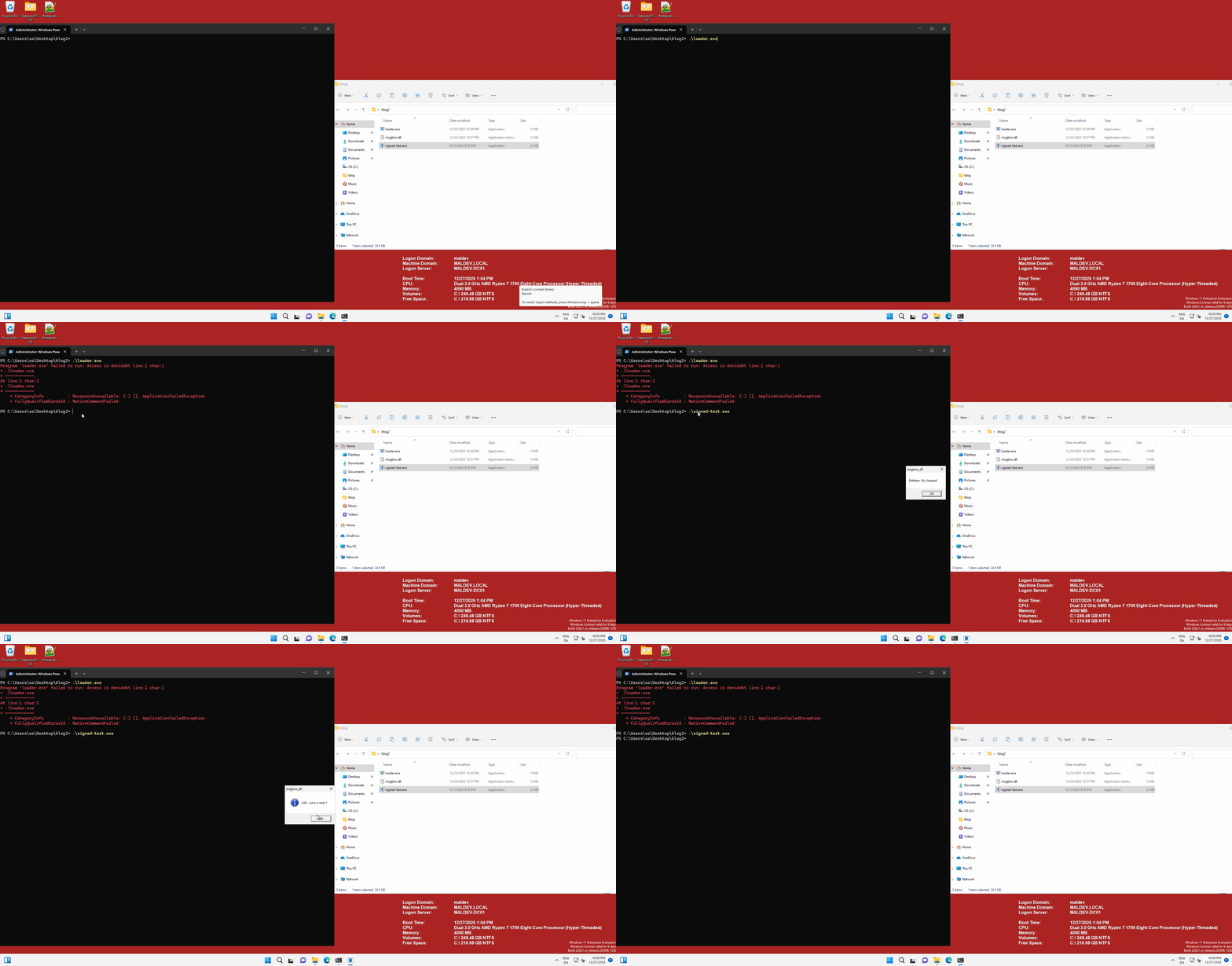
An example of this approach can be seen in the following video snippet, where a leaked certificate is used to sign a copy (signed-test.exe) of the original loader.exe binary and managed to succesfully bypass the ASR rule.
While nothing groundbreaking was discussed in this post, i hope that the tips and tricks can be of help in your future engagements. If you have any questions feel free to reach out to me.